

My xbot Go Chameleon Review
I coach varsity basketball. Every year, I look to reduce pain points in my workflow. The more stressors I can eliminate, the more I can focus my energy on coaching.
One of the tension points that continues to plague our team is video recording. Video footage is crucial since it helps us scout our opponents, identify mistakes, and build a more efficient team.
For the last 3 years, we’ve tried a variety of solutions, but we continue to run into the same problems.
- Shaky footage or a dropped signal
- Finding a volunteer to run the camera
- No easy way to live stream games to our loyal fans
With these problems at the forefront, I began searching for a better recording solution. I found that most of the solutions were subscription based and too expensive for coaches/schools/parents with a limited budget.
But then I found the XbotGo Chameleon.
This compact unit promised:
- No monthly fees and free live streaming (huge for lower budget programs)
- A variety of sports modes (potential to be used by the entire school sports staff)
- Auto tracking of player movement (no camera operator needed)
- 4k video footage with up to 60 frames per second (impressive quality)
- A 120° field of view (great for basketball, soccer, football, hockey)
- 8 hours of runtime on a single charge
The XbotGo Chameleon seemed like the solution I was looking for, so I placed an order.
There are 4 different bundles to choose from with prices ranging from $349-$569. I chose the bundle that includes the XbotGo Chameleon, a tripod, and a weather umbrella to shield the camera under poor weather conditions.
You can see my unboxing video below.
First Impressions
When I unboxed the XbotGo Chameleon, I was really impressed with the quality of the unit. It looked good, felt solid (not cheap), and included a compact semi-hard shell carrying case. That meant it would be easy for me to take this camera from game-to-game without taking up a bunch of valuable space or risking damage to the unit.
After unboxing all the items from my bundle, I looked over the instructions for the Chameleon. This unit needs to be fully-charged before its first recording session, so I hooked it up to the charger and let it sit for a few hours.
XbotGo says the unit takes 4 hours to fully charge. A full charge provides about 8 hours of runtime.

Setting Up the XbotGo Chameleon
I’m not the most technical guy, but setting up the Chameleon for the first time was very easy. The app walks you through each step and helps you pair both the camera and the remote.
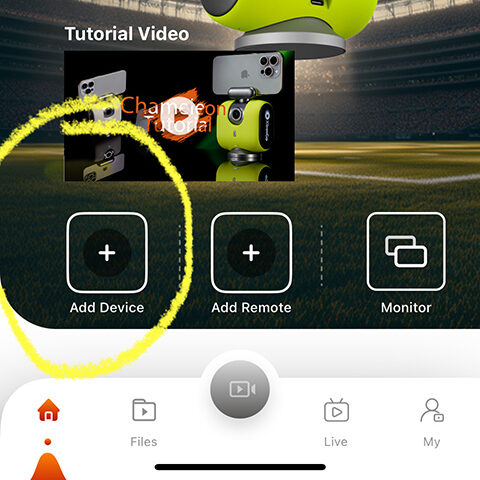
Pairing took less than 2 minutes, but the Chameleon needed several firmware updates, so I would say the setup time was 10-15 minutes total.
Once the camera and remote were paired to the app, I was ready for my first test drive.
Putting the Chameleon to the Test
As I mentioned in the introduction, I wanted this camera for recording our varsity basketball games, so I took the camera to a local AAU tournament to see what it could do.
In order for the camera to be most accurate, the app tells you to set it up near the half court line. I found a spot in the bleachers (near half court), set up the tripod, then connected the camera and the remote to the app. This took less than 5 minutes. You can download the app here: Google Play | Apple
The app prompts you to let it know what sport you’re recording (basketball) and the age group of the players on the team (14 and up or under 14). This particular tournament was 16U, so I selected 14 and up. I assume the age specification helps the built in AI co-processor track players better, but that’s just a hypothesis.
Once the game started, I hit record on the remote and stood behind the camera to make sure the app started recording. Sure enough, it did.
This is when things got fun.
After the tip-off, the camera started auto-rotating on its own, following the players as they moved up and down the court.
Fast breaks, turnovers, in-bounds plays…it didn’t matter, the XbotGo tracked all these movements with ease.
Was I impressed? Definitely.
This auto-tracking camera will eliminate my need for an in-season video recorder. It’s hard to find parents who want to record the game…most people just want to enjoy seeing their kid compete.
After monitoring the XbotGo Chameleon for the first few minutes, I walked away and just let it do its thing.
This camera solution offers hands-free, no-worry, high-quality video recording. The XbotGo Chameleon is a game-changer.
The Chameleon can also record:
- Soccer ⚽
- Basketball 🏀
- Ice hockey 🏒
- Football 🏈
- Lacrosse 🥍
- Handball 🤾
- Tennis 🎾
- Pickleball 🏓
- Lacrosse 🥍
- Badminton 🏸
That’s a pretty impressive list!
I will eventually experiment to see if it can track a golfer from tee box to putting green, but I’ll save that testing for a later date.
What about live streaming and cloud storage?
One of the other reasons I was drawn to the XbotGo Chameleon was the promise of free live streaming and cloud storage. The promise seemed too good to be true.
After recording the first AAU basketball game, I sent our athletic director a text and told him I was going to live stream the second game of the day. He said he was willing to test it out.
In order for someone to follow the live stream, they need to download the XbotGo app, then search for your channel (they can search by channel name or email address). You can also just share the URL for the live stream.
The second basketball game started, and I went live on the app.
Our athletic director was able to find the channel and watch the game from 40 miles away. He was happy to report that everything looked good on his end.
Another win for our basketball program.
Next season, parents will be able to tune into the game regardless of where they live at no extra cost.
20 GB of cloud storage is included for free with each XbotGo account and each 40 minute game is about 1 GB in size. That means I can store close to 20 games on the cloud for free.
It’s relatively easy to download the videos and delete them from the app to clear space.
The app also makes it possible to do some basic video editing, but I plan to download future videos and pull them into a more advanced video editor.
The Pros and Cons
The XbotGo Chameleon is an excellent product. If I were disappointed, I’d be the first to let you know.
There is a long list of pros for this unit. My favorites include:
Coaches will be impressed with all that the Chameleon has to offer, but this is also a great solution for parents. The camera can be set up to track a specific jersey number, so parents looking to capture highlights of their child will find that this camera is perfect for zooming in on their athlete.
The cons for this unit:
Every product has a flaw, but I was hard-pressed to find something about the Chameleon that I didn’t like.
If I were to log any complaint, it would be about the XbotGo app. It took me a few minutes to figure out how to download the video files to my camera roll. This might have more to do with my technical skills than it does with the app developer.
It would also be nice if there were a way to share a video file via email (right now you can only share to social media accounts).
These are minor details that may be adjusted in future versions of the app, but the camera itself hits all of the marks.
My Take
The XbotGo Chameleon is one of the best cameras on the market. You’d be hard-pressed to find a better camera solution for a better price.
Want to test the unit for yourself? Head on over to the XbotGo website and purchase the Chameleon. There’s a 30 day hassle-free return option, but I think your first recording session will leave you pleasantly surprised.
